> ## Documentation Index
> Fetch the complete documentation index at: https://docs.leadpipe.com/llms.txt
> Use this file to discover all available pages before exploring further.
# Filter, save views, and segments
> Turn raw visitor data into reusable workflows
## Overview
Filters help you narrow the visitor table. Saved views help your team reopen the same slice of data. Segments let you reuse those rules in automations like webhooks and integrations.
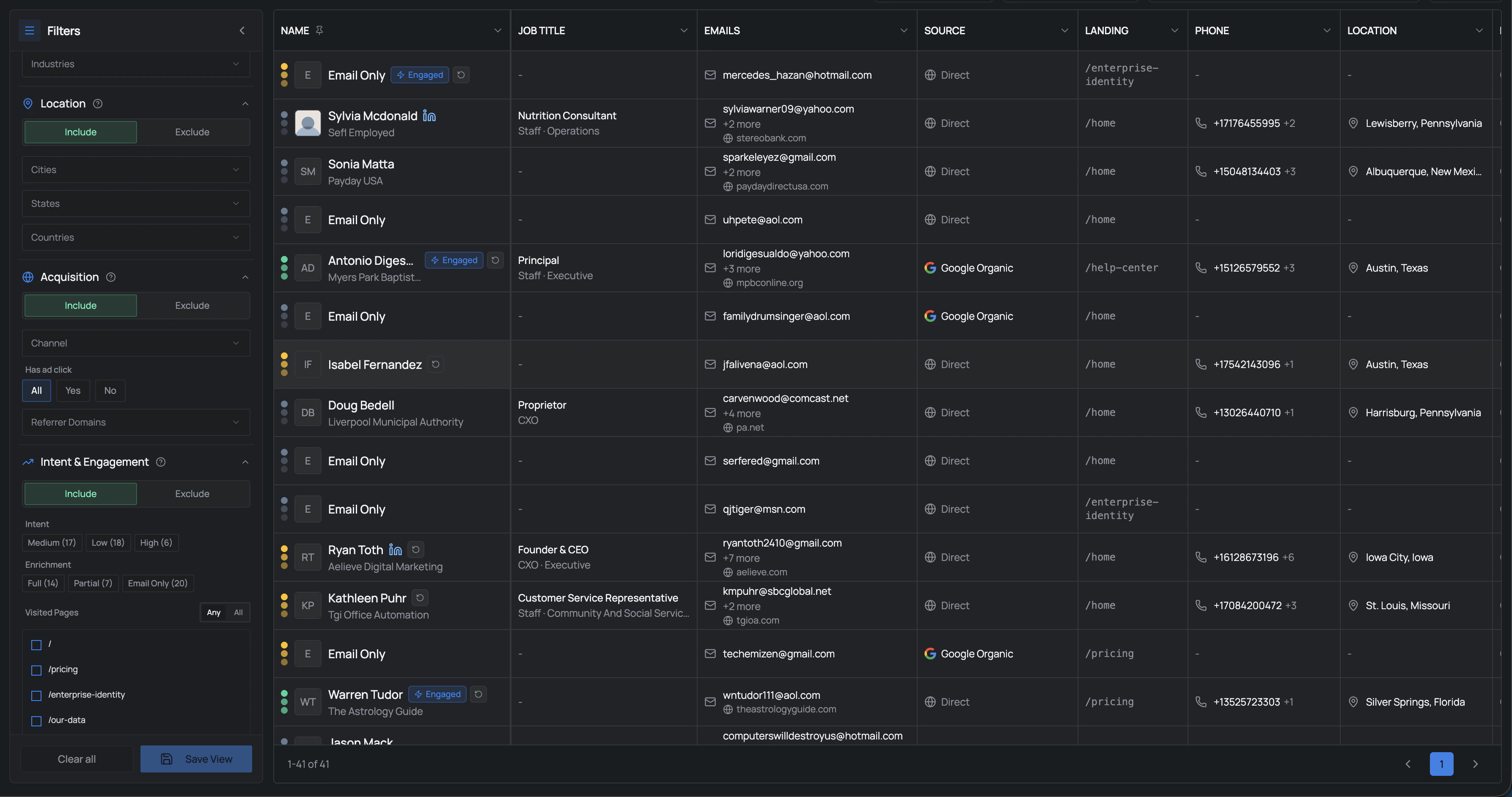 ## Common filter areas
Leadpipe groups filters around the decisions your team needs to make:
* `Professional & Company`
* `Location`
* `Acquisition`
* `Intent & Engagement`
Each group lets you either `Include` or `Exclude` matching traffic. That makes the panel useful both for finding good-fit visitors and removing noise.
## Recommended workflow
Build the view around a concrete question, such as who viewed pricing recently or which visitors came from a specific channel.
Keep the first version narrow and understandable. It is easier to refine a focused view than untangle an overloaded one.
Save useful filters as a view so you and your team can return to the same working set quickly.
When the same rules should drive webhooks or integrations, save them as a segment instead of keeping them as a one-off view.
## Working with saved views and segments
Once you save a view or segment, you can switch between them from the saved filter area without rebuilding the logic each time.
That makes it easier to:
* review the same audience every day
* compare different audience slices quickly
* reuse one saved segment across webhooks, notifications, or integrations
## Views vs. segments
| Tool | Best for |
| ---------- | ------------------------------------------------------ |
| Saved view | Reopening a useful table configuration inside Leadpipe |
| Segment | Reusing a rule set across automations and destinations |
In practice:
* a saved view is for humans working inside Leadpipe
* a segment is for workflows that need the same rules again later
## Good first segments
* Recent pricing page visitors
* High-intent visitors from paid or social sources
* Visitors from target industries or company sizes
* Visitors from one specific pixel or domain
## Common filter areas
Leadpipe groups filters around the decisions your team needs to make:
* `Professional & Company`
* `Location`
* `Acquisition`
* `Intent & Engagement`
Each group lets you either `Include` or `Exclude` matching traffic. That makes the panel useful both for finding good-fit visitors and removing noise.
## Recommended workflow
Build the view around a concrete question, such as who viewed pricing recently or which visitors came from a specific channel.
Keep the first version narrow and understandable. It is easier to refine a focused view than untangle an overloaded one.
Save useful filters as a view so you and your team can return to the same working set quickly.
When the same rules should drive webhooks or integrations, save them as a segment instead of keeping them as a one-off view.
## Working with saved views and segments
Once you save a view or segment, you can switch between them from the saved filter area without rebuilding the logic each time.
That makes it easier to:
* review the same audience every day
* compare different audience slices quickly
* reuse one saved segment across webhooks, notifications, or integrations
## Views vs. segments
| Tool | Best for |
| ---------- | ------------------------------------------------------ |
| Saved view | Reopening a useful table configuration inside Leadpipe |
| Segment | Reusing a rule set across automations and destinations |
In practice:
* a saved view is for humans working inside Leadpipe
* a segment is for workflows that need the same rules again later
## Good first segments
* Recent pricing page visitors
* High-intent visitors from paid or social sources
* Visitors from target industries or company sizes
* Visitors from one specific pixel or domain